 All use cases
Jo for photographers
Photo carousels for photographers: You’ve taken the photos. Choose what to share.
You enjoy taking photos. Jo helps you pick your favourites from a trip, a day out or time with friends, and put them together in Instagram carousels to share.
A few carousels from a trip
You take your camera on a trip and come home with photos you want to show your friends. There are a few versions of the same view, people you spent time with, and little things you noticed along the way. Open them together in Jo and choose the ones you want to share.
Bring in the photos you want to share.
Bring your camera and phone photos together from Photos or files on your Mac. Choose from the whole trip.
Choose between similar shots.
Compare photos side by side and mark your favourites. Pick the expression or little detail you like most.
Find an order that feels right.
Try a wide view beside a close-up. Move photos between carousels and adjust the crops until you’re happy with the order.
Add a few words. Share with friends.
Add a caption about the day or the people you were with. Export the slides, then share them on Instagram.
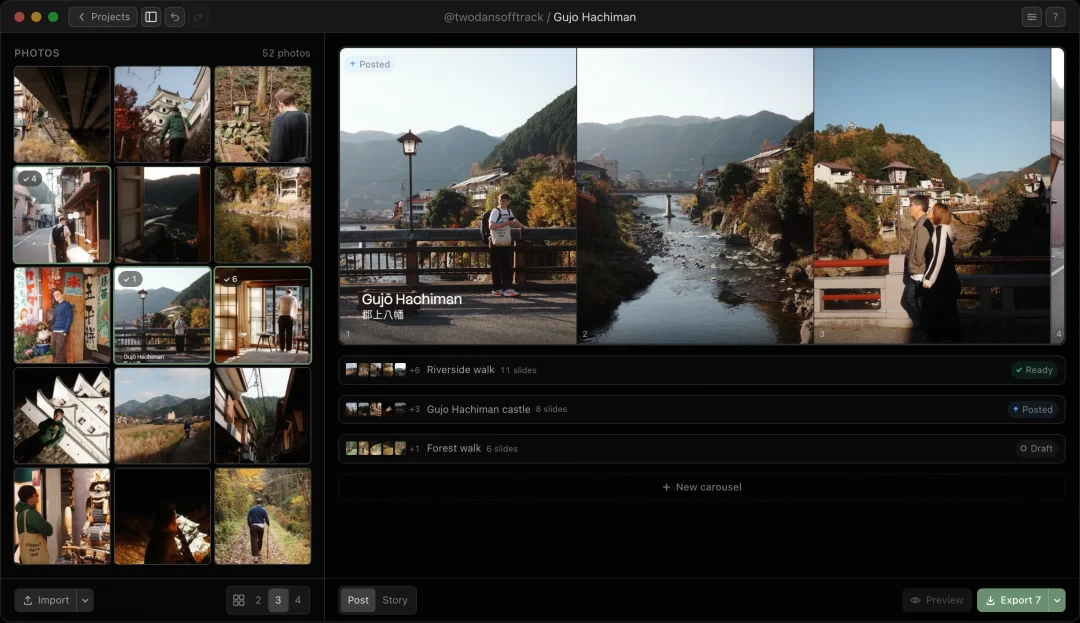
The trip on the left. The posts on the right.
Every photo from a town, with the favourites starred and the posted ones greyed. Beside them, a carousel for each place. Move a frame from one to the other and see the change straight away.
Questions from photographers
How do I choose photos for a carousel?
Start with the photos you want to share from a trip, a walk or a day with friends. Compare similar frames side by side and mark your favourites. Arrange a first sequence, then check which photos add something different. Keep unused shots in the project for another carousel.
Can I edit my photos before bringing them into Jo?
Yes. If you like to adjust the light or colours first, use your usual photo editor and bring the finished images into Jo. You can also start with the photos as they are. Jo helps you choose, arrange and crop them for your posts.
Can I make a panorama across two carousel slides?
Yes. Jo can split a wide photo across two adjacent slides. Place it where it works in the sequence, adjust the framing, and export the slides in order. This is useful when you want to keep more of a landscape in the carousel.
Can I use photos from Apple Photos or files on my Mac?
Yes. Browse your Photos library or import image files from your Mac. Bring the photos from a trip or day out into one project, then put a few carousels together with all your pictures in view.
What happens to my photos when I use Jo?
Jo processes photos on your Mac and has no server for your photos or projects. With iCloud sync enabled, project content syncs through your private iCloud database. You can turn sync off in Settings.